Use the web app now, or see what’s coming to desktop and mobile.
Available now
Web App
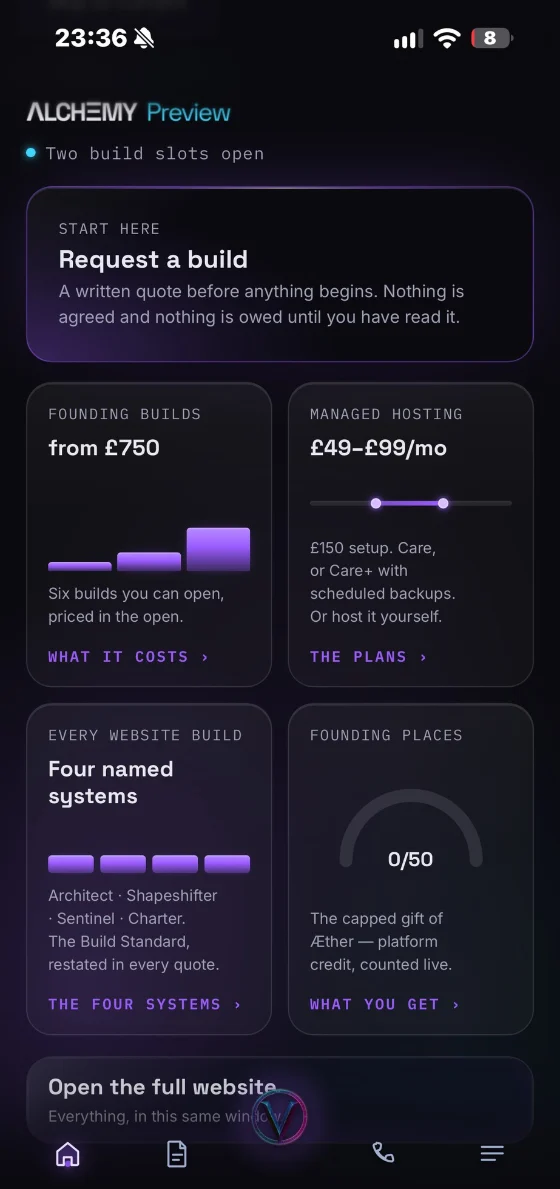
Use Alchemy Preview in your browser, and on supported browsers install it for quicker, app-like access — its own icon, its own window, and requests, pricing and support a tap away.
Works offline
Instant updates
Home-screen install
No store fees
How to install it here
Install on your computer
01Look at the end of the address bar A small install icon — a screen with a downward arrow — appears there.
02Or open the ⋮ menu Edge lists it under Apps; Chrome under Cast, save and share.
03Choose Install Alchemy Preview gets its own window and a taskbar or dock icon.
How it stays up to date
Updates itself. Each time you open it, or come back to it, it checks for a newer version and switches over the next time you put it away — never while you are in the middle of something. There is nothing to download.
Available now
For this device
Windows Desktop
A dedicated desktop window, with Alchemy Preview running outside the browser and its own shortcut on the machine. It carries the whole site inside it, so it opens with no connection at all.
02Run it. Windows may ask you to confirm an app from an unidentified publisher: this build is not code-signed yet, and choosing More info then Run anyway is how you get past it.
03It lands in Start and on your desktop, and opens in its own window.
Checks automatically when you open it. When a newer version is available, choose Update and restart after saving your work. The app downloads the update over HTTPS and verifies its signature before installing. Offline, your current version keeps working. You can also install the latest version from this page.
In private build
Microsoft Store
The same Windows app, listed on the Microsoft Store — so it installs and updates the way everything else on your PC does, with no download to find.
Microsoft Store
Windows 11 & 10
Managed updates
Verified publisher
How it stays up to date
Once it is listed, the Microsoft Store keeps the Windows app up to date for you, the way it does every app on your PC.
In private build
Android
A dedicated Android version for phones and tablets, in private build — it exists and is being built and tested — distributed through Google Play.
Google Play
Phones & tablets
Dedicated app
Touch optimised
How it stays up to date
Once it is on Google Play, updates arrive the way Google Play delivers them for every app on your phone or tablet.
Home-screen install
On your phone in one scan.
Use Alchemy Preview in your browser, and on supported browsers install it for quicker, app-like access — its own icon, its own window, and requests, pricing and support a tap away.
Point your phone’s camera here: it opens the install steps for the phone in your hand.
iPhone and iPad Safari, then Share, then Add to Home Screen
Android Chrome’s menu, then Install app
Android app in private build
In this version
1.9.0 · 8 November 2026
Every promise worded the way the Terms say it, Vyra’s orb drawing in a lane of her own, and first screens that arrive sooner on a slow phone
AddedHosting and Pricing say what the Terms already promise: past the first 90 days, defects in what I built stay free to fix for as long as you are on Care, and your monthly fee is held for 12 months from the day hosting starts, with 30 days' written notice of any change after that.
AddedThe Terms (version 1.3): your own copy of the Launch Archive comes with your handover.
ChangedHome and Custom Systems say another developer can take over, where they said any developer; the Build Standard says each build is made for every phone, screen and hand.
ChangedThe Launch Archive is described the same way everywhere: kept for as long as I am trading, with your own copy in your handover, in place of a promise that launch day can always be brought back.
Safe to install
Checked, byte for byte.
Check it is really ours
Windows will say it protected your PC, because this build is not code-signed yet. Choose More info, then Run anyway. That warning is about a missing certificate rather than about the file being unsafe — and here is how you can tell the difference for yourself.
In PowerShell, from the folder you downloaded it to, run Get-FileHash Alchemy-Preview-Setup.exe -Algorithm SHA256. If it matches the figure above, what you have is exactly what was published here, byte for byte.
Windows app
Windows 10 & 11 · 62 MB · works offline
Web app
Installs from Chrome, Edge, Brave and Safari; Firefox on Windows pins it to the taskbar
iPhone and iPad
Safari’s Add to Home Screen
Android
Chrome’s Install app
Updates
The web app updates in the background; Windows asks you first
Both are this site, in a window of its own, and both work offline. The web app installs from your browser on any device and updates itself; the Windows app is a download with its own installer, and asks you before it updates.
Why does Windows warn me about the publisher?
The installer is not code-signed yet, so Windows may say the publisher is unidentified — choose More info, then Run anyway. Its SHA-256 is printed on this page, so you can check it is the exact file before you run it, and every update is signed and checked before it installs.
What does it keep on my device?
A copy of the site, so it opens without a connection, and a note that this install has been counted. Neither is sent anywhere. The Cookie Policy lists each one.
Was my install counted?
Once — when your browser confirms it, or the first time the installed app opens. What is kept is one more in a running total for your country, never who you are, as the Privacy Policy explains.
Will it change without me knowing?
The web app switches to a new version only when you put it away, never in the middle of something; Windows asks first. Every change is listed on What’s new.
How do I remove it?
As you remove any app: on iPhone or iPad, touch and hold its icon and remove it; on Android, touch and hold it and uninstall; on Windows, Settings › Apps › Installed apps. Clearing your browser’s data clears what it kept.
What answers you
Not an AI. On purpose.
Inside the app, today
Ask it anything and it answers by quoting this site — word for word, and it shows you the passage it came from. It cannot invent a price, promise a date, or say something the site does not already say, because it has nothing of its own to say.
That is the point. On a page about money and contracts, an answer you can check beats an answer that sounds clever.
Quotes published pages
Shows its source
Invents nothing
Public Vyra
Public Vyra is the AI system owned by Vyra Ltd. It is separate from this app’s source-based answer tool. Nothing here is an early version of Public Vyra.
Meet Vyra explains what is available today and what is still being developed.
These counters started at zero on the day Alchemy Preview became installable, and only move when a real install is confirmed.
Installs
—
Countries
—
Platforms available
2 of 4
Channel Islands
Jersey
Install statistics are temporarily unavailable. Please check again later.
Every install counts once: when your browser confirms it, or the first time the installed app is opened — that is how Safari and the Windows app are counted.
Jersey This is where we are
Country statistics are temporarily unavailable. Please check again later.
Counted by country only. An install adds one to its country’s number and nothing is kept with it — no account, no address, no tracking across the site. To stop anyone writing these numbers for us, the server holds a request’s address briefly, as the Privacy Policy explains.
Alchemy Preview
Take Alchemy Preview with you.
Install the web app now, or choose another platform as they become available.